Where Is Your AI Traffic Hiding, and How Do You Track It?
Someone asks ChatGPT for a recommendation, your site shows up in the answer, and they click through. Where does that visit end up in Google Analytics? It might get its own row, be filed under Referral, or be counted as Direct, as if the visitor had typed your URL.
This guide shows you how to track AI traffic from ChatGPT, Gemini, Perplexity and Claude in GA4. It covers what each platform passes along when someone clicks, how to build a channel that collects all of it in one place, and why the number you end up with is a floor, not a total.
Why AI traffic doesn't show up clearly in your analytics
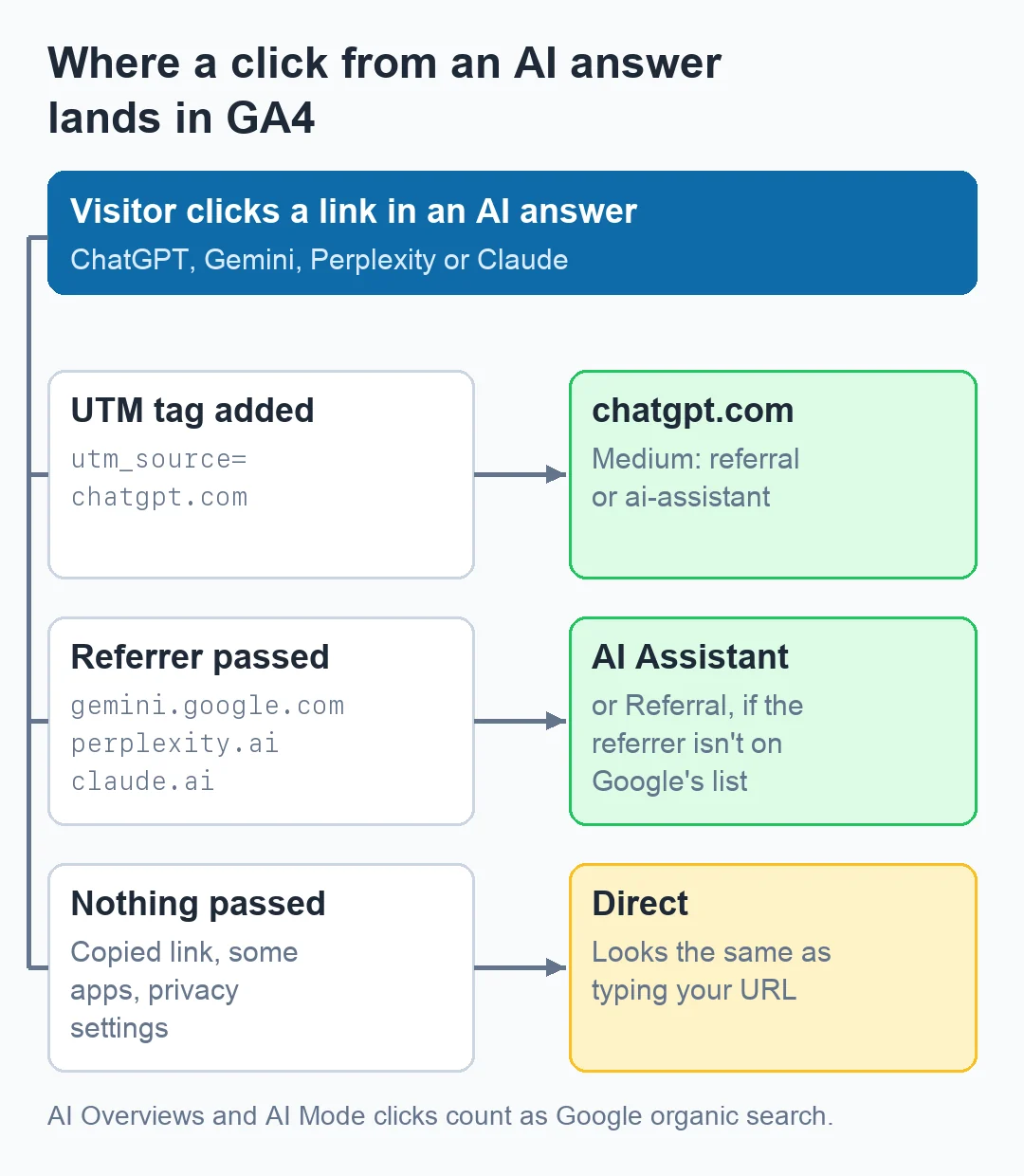
Analytics tools work out where a visit came from mainly from two signals: the referrer (the page the browser says the visitor just left) and any UTM parameters in the URL. AI assistants don't handle either one consistently.
- Some send a referrer, some add a UTM tag, some send nothing. When the browser passes a referrer such as
gemini.google.com, GA4 can see the source. When it doesn't, the visit has no origin to show. - Apps and copy-paste leave no trace. If someone copies a link out of an AI answer and pastes it into a new tab, there's no referrer and no UTM. GA4 records that visit as Direct, and nothing in the report can tell it apart from someone typing your URL.
- Google's AI features count as Google. Clicks from AI Overviews and AI Mode arrive from Google Search, so they're reported inside organic search. Google's own documentation says they're excluded from its AI Assistant channel.
Until May 2026, GA4 had no built-in way to separate this traffic. On May 13, 2026, Google added an AI Assistant channel to the Default Channel Group. When the referrer matches Google's list of recognized AI assistants, GA4 sets the medium to ai-assistant and the campaign to (ai-assistant).
Google's announcement names ChatGPT, Gemini and Claude as examples (Google Analytics Help: What's new). The channel's definition page gives a different set: ChatGPT, Gemini, DeepSeek, Copilot and Grok (Google Analytics Help: Default channel group). Neither publishes the full list, so you still need to check what's being caught.
How to track ChatGPT traffic
ChatGPT is the easiest of the four to spot, because OpenAI tags its links. According to OpenAI's publisher FAQ, ChatGPT adds utm_source=chatgpt.com to the URLs it links to from search results (OpenAI Help Center).
To find it in GA4:
- Go to Reports → Acquisition → Traffic acquisition.
- Change the primary dimension to Session source / medium.
- Search the table for
chatgpt.
You'll usually see chatgpt.com / referral, or chatgpt.com / ai-assistant if the new channel has picked it up. In properties with data from before 2024, you may also see chat.openai.com, ChatGPT's old domain.
Not every ChatGPT visit carries the tag. Links copied out of a conversation lose both the tag and the referrer, and those sessions land in Direct.
How to track Gemini traffic
Gemini traffic comes through with the referrer gemini.google.com, and Google names Gemini among the assistants its AI Assistant channel covers (Google Analytics Help).
To check traffic from Gemini:
- Open Traffic acquisition and set the dimension to Session source / medium.
- Search for
gemini. - If you have historical data, search for
bardtoo. Gemini was called Bard until early 2024, so older sessions may showbard.google.com.
One distinction matters here: Gemini is not Google Search. A click from the Gemini app is a Gemini visit. A click from an AI Overview on a Google results page is a Google organic visit, so a Gemini filter won't show your AI Overviews traffic. Search Console is the closer source for that, since Google counts AI Overview and AI Mode impressions and clicks in its Web search performance data (Google Search Central).
How to track Perplexity traffic
Perplexity shows numbered source links next to its answers, so clicking through to a cited page is a normal part of using it. The referrer to look for is perplexity.ai.
Search Traffic acquisition for perplexity. Then check the medium next to it:
- If it shows
ai-assistant, GA4's built-in channel is catching it. - If it shows
referral, it's being filed with ordinary referral sites, and you'll want the custom channel described below.
Perplexity isn't named on either of Google's AI Assistant pages, so check where its sessions actually land.
How to track Claude traffic
Claude links out when it uses web search or cites sources, and visits that pass a referrer show up as claude.ai. Google's AI Assistant announcement names Claude, but the channel's definition page doesn't. Both pages list examples, not the full set, so confirm in your own data.
The same checks apply. Search for claude in Traffic acquisition, confirm the medium, and keep in mind that visits from desktop and mobile apps may arrive without a referrer and be counted as Direct.
Traffic from a single AI assistant can be small and irregular. What matters is whether the trend holds and what those visitors do once they arrive.
Setting it up in GA4: one channel for all AI traffic
For ongoing reporting, build a custom channel group so that every AI source rolls up into one row you can compare with Organic Search, Paid Search and the rest.
Step 1: Confirm the source values in your own property
Before writing any rule, open Traffic acquisition with Session source as the dimension and search for each platform. Write down the exact strings you see. They can vary between properties, and your rule has to match what's actually in your data.
Step 2: Create the channel group
- Go to Admin → Data display → Channel groups.
- Click Create new channel group. GA4 starts you from a copy of the default channels.
- Name it something clear, such as "Channels + AI".
Standard GA4 properties allow two custom channel groups, so name this one so it's obvious what it's for (Google Analytics Help).
Step 3: Add an AI channel with a regex rule
Click Add new channel, name it "AI Traffic", and add one condition:
- Dimension: Source
- Operator: matches regex
- Value:
.*(chatgpt\.com|chat\.openai\.com|gemini\.google\.com|bard\.google\.com|perplexity\.ai|claude\.ai|copilot\.microsoft\.com).*Wrapping the pattern in .* at both ends means it works whether GA4 treats the regex as a full match or a partial one. Add or remove domains to match what you found in Step 1.
Step 4: Move it above Referral
This step is easy to skip, and it decides whether the channel works. GA4 assigns each session to the first channel in the list whose rule it matches. If "AI Traffic" sits below Referral, a visit from perplexity.ai / referral matches Referral first and never reaches your AI channel. Drag "AI Traffic" above Referral, then save.
Step 5: Use it in your reports
In Traffic acquisition, switch the primary dimension to your new channel group. Custom channel groups apply to historical data as well, so you can look back at earlier months right away.
If you'd rather not maintain the regex yourself, our AI traffic analytics dashboard reads the same GA4 data and splits it by platform.
What the numbers actually mean
It's a floor, not a total. Every AI visit that arrives without a referrer or UTM tag (copied links, some in-app browsers, some privacy settings) is counted as Direct. Your AI channel shows the part you can prove. If Direct traffic to deep content pages rises while your AI channel rises too, part of that Direct growth may come from the same source.
Traffic isn't visibility. An AI assistant can mention your brand in many answers without anyone clicking through. Analytics only records the clicks. To see whether you're being mentioned at all, you need to check the answers themselves, which you can do once with our free AI brand visibility check or on a schedule with AI Brand Monitor.
Look at what visitors do, not just how many arrive. Compare engagement rate, pages per session and conversions for the AI channel against organic search. Someone who clicks through from an answer has usually just read something about you, and it's worth knowing whether that turns into action.
Watch the trend, not single days. Small channels swing a lot. Compare month to month, and note the dates you changed content or setup.
When you're ready to follow these trends without rebuilding the report each month, you can track AI referrals over time in WebSkeet using the GA4 connection you already have.
Frequently asked questions
Is it possible to know how much traffic comes from Perplexity?
Yes, for visits that pass a referrer. In GA4, open Traffic acquisition, set the dimension to Session source / medium, and search for "perplexity". Visits where the link was copied, or where the app didn't pass a referrer, are counted as Direct, so treat the figure as a minimum.
How do I check traffic from Gemini?
Search Traffic acquisition for "gemini" (and "bard" for older data). The source is gemini.google.com. Clicks from AI Overviews and AI Mode in Google Search are not Gemini traffic. They're reported as Google organic.
Can I measure leads that come from ChatGPT and other AI assistants?
Yes. Once your AI channel is set up, any conversion or key event you already track in GA4 can be broken down by that channel. Open the Key events report or an exploration, add your custom channel group as a dimension, and you'll see which leads came from AI traffic, within the same attribution limits as every other channel.
What tools can track ChatGPT and Perplexity traffic?
GA4 does it for free with the setup above, and since May 2026 it includes a built-in AI Assistant channel. Dedicated tools read the same data and save you maintaining the rules by hand, but no tool can recover visits that arrived without a referrer.
Do I need to add UTM tags for AI traffic?
No. You can't control the links an AI assistant generates. ChatGPT adds its own utm_source=chatgpt.com, and the other platforms rely on the referrer. Your part is making sure GA4 classifies those signals correctly, which is what the custom channel does.